Fixing Google Photos Exports
The Google Takeout Trap: Why Your Memories Are Held Hostage
This blog post is more of a technical breakdown of the problem and the solution - If you're just looking for the tool to fix your photos metadata, visit Google Photos Sidecar Fixer.
My parents love to travel, relying heavily on the Google Photos ecosystem to catalogue their memories with locations and captions. However, the moment they tried to export that data, they discovered the 'Takeout Trap' (or Vendor lock in as it's more commonly known) While Google allows you to leave, the export process strips the context from the content. As soon as these get exported from Google, the metadata is stripped, and all the time spent cataloging the photos is lost.
If you’ve ever tried to leave the Google Photos ecosystem, or even just save your photos for offline use - in this instance, to have a copy for digital photo frames, you ask for your data back, and Google obliges, by handing you a massive ZIP file where your beautiful photos have been stripped of their souls. Or even worse if you're using the direct export.
The dates are wrong. The GPS coordinates are gone. The descriptions you spent years writing? They’re sitting in a separate, cryptic .json file that no photo viewer on earth understands.
The "Standard" Problem
Why does a trillion-dollar company give you broken files? Maybe it's not malice; it's a collision between proprietary cloud databases and the messy reality of file standards.
Metadata (EXIF, IPTC, XMP, JFIF, etc.) is the special section in the file headers that store all of the supplimentry information about your photo. But as it's not a standardized format, it's a mess, as everyone (literally everyone) seems to think they can do it better. It's the classic XKCD "Standards" problem come to life.

Being devil's advocate for the Google Photo's dev team, prioritizing a proprietary cloud database over constant file-header synchronization is a logical engineering decision for their scale. It optimizes for search speed and indexing. However, this architectural choice shifts the burden of interoperability onto the user, effectively creating a soft vendor lock.
None of these are "new" standards either, and they all have different main uses, but oftern overlap.
| Format | Focus | Key Creator | Year |
|---|---|---|---|
| EXIF | Technical/Camera Settings | JEIDA/CIPA | 1995 |
| IPTC | Editorial/Copyright | IPTC | 1991 |
| XMP | Extensible/Standardized | Adobe | 2001 |
| JFIF | Basic File Interchange | C-Cube Microsystems | 1991 |
| ICC | Color Management | ICC | 1993 |
| PLUS | Licensing & Rights | PLUS Coalition | 2004 |
| DICOM | Medical Imaging | ACR / NEMA | 1993 |
| Dublin Core | Library/Archive Cataloging | DCMI | 1995 |
| C2PA | AI Provenance & Trust | C2PA Coalition | 2021 |
| Apple MakerNotes | Proprietary hardware data | Apple Inc. | ~1990s |
| GCamera (XMP) | Google-specific AI/Depth | ~2014 | |
| Apple HEVC/HEIC | Multi-image/Depth/Live | MPEG / Apple | 2017 |
| GDepth | Android Depth Map data | 2014 |
When you export from Google, they don't bother re-injecting your edits into the image files. Instead, they give you a "sidecar" file. As far as google Photos is concerned, IMG_1234.jpg and IMG_1234.jpg.json are related. (Or any combination of file names due to Google Takeout's arbitary character limits). To your computer’s gallery app? They are just two random files.
The Gap: Dev-Heavy vs. Paid-Play
Until now, if you wanted to fix this, you had two choices:
- The Dev Route: Install Perl, download
ExifToolCLI, and spend three hours on StackOverflow trying to figure out the exact regex to mapPhotoTakenTime.timestamptoDateTimeOriginal. - The Paid Route: Buy a product to use once and then forget about it.
Not Everything Needs to be a standalone "App"
There’s a growing fatigue with platforms. We don't need another startup, another login, or another database. Sometimes, you just need a tool. A hammer doesn't require a cloud sync; it just hits the nail. Hopefully making this tool and writing this blog post allows Google to index it (oh the irony) and helps more people.
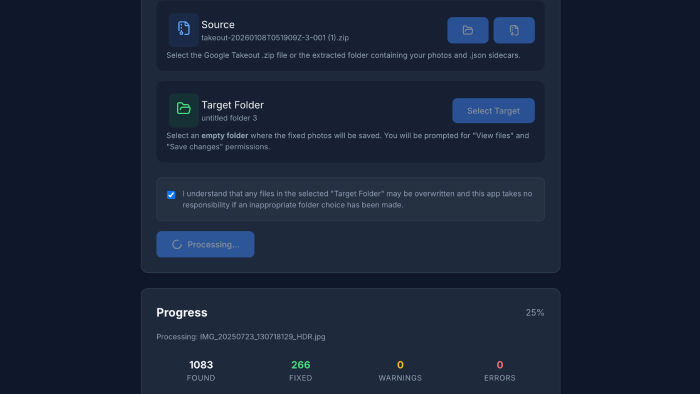
Enter WASM and the Private Browser
I built this metadata fixer using the WebAssembly (WASM) port of ExifTool (the industry standard) directly in the browser, created a tool that:
- Never touches a server: Your private photos stay on your hard drive. The "upload" is just a local memory pointer.
- Requires zero installation: No Perl, no CLI, no "Allow apps from unidentified developers."
- Uses the File System Access API: You pick a source, pick a target, and the browser handles the rest with native-speed performance.
The primary architectural trade off of this local-first approach is processing speed. By purposely omitting server side processing to guarantee privacy, we are limited by the client's single threaded CPU capabilities in the browser. While WebAssembly creates a bridge for powerful tools like ExifTool, the I/O overhead of the File System Access API remains a bottleneck for massive libraries.
This tool isn't about reinventing the wheel; it's about orchestration. By integrating existing, proven technologies (ExifTool, WASM, FileSystem API) into a single PWA, we can solve a modern data portability problem with a lightweight, disposable utility.
Under the Hood: The Tech Stack
-
File System Access API
- The Magic: This API allows the web app to read from and write directly to your local hard drive.
- Pro: Zero upload time. You can process 50GB of photos because they never actually leave your disk; the browser just gets a "handle" to them.
- Con: Browser support is generally limited to Chromium-based browsers (Chrome, Edge, Brave).
-
Client-Side Unzipping
- The Magic: Using
@zip.js/zip.js, we can stream the contents of your massive Google Takeout zip file directly into memory without ever extracting it to your disk first. - Pro: Saves huge amounts of disk space and time. You don't need double the free space (one for the zip, one for the extracted files).
- Con: Requires significant RAM for larger files if not handled carefully (we stream it to keep it light).
- The Magic: Using
-
Metadata Reinjection (The Hybrid Approach)
- The Magic: We use a two-tiered system to fix your photos. First, we attempt to use
piexifjs, a lightweight JavaScript library that can inject EXIF data into JPEGs in milliseconds. If that fails (or for complex file types), we fall back to a WebAssembly port of the legendaryExifTool. - Pro: Speed meets reliability. We get the raw speed of JS for 99% of files, but the robustness of the industry-standard CLI tool when needed.
- Con: WebAssembly is powerful but heavy; initializing the ExifTool instance takes a moment.
- The Magic: We use a two-tiered system to fix your photos. First, we attempt to use
The TL;DR
We shouldn't all have to be software engineers to own our own memories. By leveraging WASM and PWA functionality, we can build privacy-first tools that do one thing well, then disappear.
Your photos belong to you, not to a JSON sidecar, and certainly not to a vendor's lock in strategy.
This is an independent tool and is not affiliated with, sponsored by, or endorsed by Google LLC or Alphabet Inc. Google Photos and Google Takeout are trademarks of Google LLC.